Basic Tutorial #
Section 1. Querying Data #
- Select – show you how to query data from a single table.
- Column aliases – learn how to assign temporary names to columns or expressions within a query.
- Order By – guide you on how to sort the result set returned by a query.
- Select Distinct – show you how to remove duplicate rows from the result set.
Section 2. Filtering Data #
Where – filter rows based on a specified condition.
AND operator – combine two boolean expressions and return true if both expressions evaluate to true.
OR operator – combine two boolean expressions and return false if either expression evaluates to false.
Limit – retrieve a subset of rows generated by a query.
Fetch – limit the number of rows returned by a query.
FETCH子句在功能上等同于LIMIT子句
OFFSET row_to_skip { ROW | ROWS }
FETCH { FIRST | NEXT } [ row_count ] { ROW | ROWS } ONLY
In – select data that matches any value in a list of values.
Between – select data that is a range of values.
- value BETWEEN low AND high
- value >= low AND value <= high
Like – filter data based on pattern matching.
~~ LIKE ~~* ILIKE 不区分大小写 !~~ NOT LIKE !~~* NOT ILIKE Is Null – check if a value is null or not.
Section 3. Joining Multiple Tables #
- Joins – show you a brief overview of joins in PostgreSQL.
- Table aliases – describes how to use table aliases in the query.
- Inner Join – select rows from one table that have the corresponding rows in other tables.
- Left Join – select rows from one table that may or may not have the corresponding rows in other tables.
- Self-join – join a table to itself by comparing a table to itself.
- Full Outer Join – use the full join to find a row in a table that does not have a matching row in another table.
- Cross Join – produce a Cartesian product of the rows in two or more tables.
- Natural Join – join two or more tables using implicit join conditions based on the common column names in the joined tables.
Section 4. Grouping Data #
- Group By – divide rows of a result set into groups and optionally apply an aggregate function to each group.
- Having – apply conditions to groups, which allow you to filter groups.
Section 5. Set Operations #
- Union – combine result sets of multiple queries into a single result set.
- Intersect – combine the result sets of two or more queries and return a single result set containing rows that appear in both result sets.
- Except – return the rows from the first query that do not appear in the output of the second query.
Section 6. Grouping sets, Cubes, and Rollups #
- Grouping Sets – generate multiple grouping sets in reporting.
- Cube – define multiple grouping sets that include all possible combinations of dimensions.
- Rollup – generate reports that contain totals and subtotals.
Section 7. Subquery #
- Subquery – write a query nested inside another query.
- Correlated Subquery – show you how to use a correlated subquery to perform a query that depends on the values of the current row being processed.
- ANY – retrieve data by comparing a value with a set of values returned by a subquery.
- ALL – query data by comparing a value with a list of values returned by a subquery.
- EXISTS – check for the existence of rows returned by a subquery.
Section 8. Common Table Expressions #
- PostgreSQL CTE – introduce you to PostgreSQL common table expressions or CTEs.
- Recursive query using CTEs – discuss the recursive query and learn how to apply it in various contexts.
Section 9. Modifying Data #
In this section, you will learn how to insert data into a table with the INSERT statement, modify existing data with the UPDATE statement, and remove data with the DELETE statement. Additionally, you will learn how to use the UPSERT statement to merge data.
- Insert – guide you on how to insert a single row into a table.
- Insert multiple rows – show you how to insert multiple rows into a table.
- Update – update existing data in a table.
- Update join – update values in a table based on values in another table.
- Delete – delete data in a table.
- Upsert – insert or update data if the new row already exists in the table.
Section 10. Transactions #
- PostgreSQL Transactions – show you how to handle transactions in PostgreSQL using BEGIN, COMMIT, and ROLLBACK statements.
Section 11. Import & Export Data #
You will learn how to import and export PostgreSQL data from and to CSV file format using the copy command.
- Import CSV file into Table – show you how to import CSV file into a table.
- Export PostgreSQL Table to CSV file – show you how to export tables to a CSV file.
Section 12. Managing Tables #
In this section, you will begin exploring the PostgreSQL data types and learn how to create new tables and modify the structure of the existing ones.
- Data types – cover the most commonly used PostgreSQL data types.
- Create a table – guide you on how to create a new table in the database.
- Select Into & Create table as – shows you how to create a new table from the result set of a query.
- Auto-increment column with SERIAL – uses SERIAL to add an auto-increment column to a table.
- Sequences – introduce you to sequences and describe how to use a sequence to generate a sequence of numbers.
- Identity column – show you how to use the identity column.
- Alter table – modify the structure of an existing table.
- Rename table – change the name of the table to a new one.
- Add column – show you how to add one or more columns to an existing table.
- Drop column – demonstrate how to drop a column of a table.
- Change column data type – show you how to change a column’s data.
- Rename column – illustrate how to rename one or more table columns.
- Drop table – remove an existing table and all of its dependent objects.
- Truncate table – remove all data in a large table quickly and efficiently.
- Temporary table – show you how to use the temporary table.
- Copy a table – show you how to copy a table to a new one.
Section 13. PostgreSQL Constraints #
- Primary key – illustrate how to define a primary key when creating a table or adding a primary key to an existing table.
- Foreign key – show you how to define foreign key constraints when creating a new table or adding foreign key constraints for existing tables.
- DELETE CASCADE – show you how to automatically delete rows in child tables when the corresponding rows in the parent table are deleted.
- CHECK constraint – add logic to check value based on a Boolean expression.
- UNIQUE constraint – ensure that values in a column or a group of columns are unique across the table.
- NOT NULL constraint – ensure values in a column are not NULL.
- DEFAULT constraint – specify a default value for a column using the DEFAULT constraint.
Section 14. PostgreSQL Data Types in Depth #
- Boolean – store
TRUEandFALSEvalues with the Boolean data type. - CHAR, VARCHAR, and TEXT – learn how to use various character types including
CHAR,VARCHAR, andTEXT. - NUMERIC – show you how to use
NUMERICtype to store values that precision is required. - DOUBLE PRECISION – learn to store inexact, variable-precision numbers in the database. The DOUBLE PRECISION type is also known as the FLOAT type.
- REAL – guide you on how to use single-precision floating-point numbers in the database.
- Integer – introduce you to various integer types in PostgreSQL including
SMALLINT,INTandBIGINT. - DATE – introduce the
DATEdata type for storing date values. - Timestamp – understand timestamp data types quickly.
- Interval – show you how to use interval data type to handle a period effectively.
- TIME – use the
TIMEdatatype to manage the time of day values. - UUID – guide you on how to use
UUIDdatatype and how to generateUUIDvalues using supplied modules. - Array – show you how to work with arrays and introduce you to some handy functions for array manipulation.
- hstore – introduce you to the hstore data type, a set of key/value pairs stored in a single value in PostgreSQL.
- JSON – illustrate how to work with JSON data type and use some of the most important JSON operators and functions.
- User-defined data types – show you how to use the
CREATE DOMAINandCREATE TYPEstatements to create user-defined data types. - Enum – learn how to create an enum type that defines a list of fixed values for a column.
- XML – show you how to store XML documents in the database using the XML data type.
- BYTEA – learn how to store binary strings in the database.
- Composite Types – show you how to define a composite type that consists of multiple fields.
Section 15. Conditional Expressions & Operators #
- CASE – show you how to form conditional queries with
CASEexpression. - COALESCE – return the first non-null argument. You can use it to substitute
NULLby a default value. - NULLIF – return
NULLif the first argument equals the second one. - CAST – convert from one data type into another e.g., from a string into an integer, from a string into a date.
Section 16. PostgreSQL Utilities #
- psql commands – show you the most common psql commands that help you interact with psql faster and more effectively.
Section 17. PostgreSQL Recipes #
- How to compare two tables – describe how to compare data in two tables in a database.
- How to delete duplicate rows in PostgreSQL – show you various ways to delete duplicate rows from a table.
- How to generate a random number in a range – illustrate how to generate a random number in a specific range.
- EXPLAIN statement – guide you on how to use the
EXPLAINstatement to return the execution plan of a query. - PostgreSQL vs. MySQL – compare PostgreSQL with MySQL in terms of functionalities.
Advanced PostgreSQL Tutorial #
This advanced PostgreSQL tutorial covers the advanced concepts including stored procedures, indexes, views, triggers, and database administrations.
PostgreSQL PL/pgSQL #
This PostgreSQL stored procedures section shows you step by step how to develop PostgreSQL user-defined functions using PL/pgSQL procedural language.
PostgreSQL Triggers #
This section provides you with PostgreSQL trigger concept and shows how to manage triggers in PostgreSQL.
PostgreSQL Views #
This section introduces you to PostgreSQL views concept and shows you how to manage views in the database.
PostgreSQL Indexes #
In this tutorial, you will learn how to use PostgreSQL indexes to enhance the data retrieval speed and various index types.
PostgreSQL Administration #
PostgreSQL administration covers common database administrative tasks including role and database management, backup, and restore.
PostgreSQL Administration #
The PostgreSQL administration covers the most important PostgreSQL database server administration tasks.
Section 1. Managing Databases #
In this section, you will learn how to manage databases in PostgreSQL including creating databases, modifying existing database features, and deleting databases.
- Create Database – create a new database using
CREATE DATABASEstatement.
CREATE DATABASE database_name
WITH
   [OWNER =  role_name]
   [TEMPLATE = template]
   [ENCODING = encoding]
   [LC_COLLATE = collate]
   [LC_CTYPE = ctype]
   [TABLESPACE = tablespace_name]
   [ALLOW_CONNECTIONS = true | false]
   [CONNECTION LIMIT = max_concurrent_connection]
   [IS_TEMPLATE = true | false ];
OWNER 指定的属于哪个用户如果不指定默认使用执行该语句的账户
CONNECTION LIMIT 并发连接数默认为
-1表示不限制ALLOW_CONNECTIONS 是否允许并发连接,如果为
false则无法连接该库CREATE DATABASE hr WITH ENCODING = 'UTF8' CONNECTION LIMIT = 100;
- Alter Database – modify the features of an existing database using the
ALTER DATABASEstatement.
The
ALTER DATABASEstatement allows you to carry the following action on the database:
- Change the attributes of the database
ALTER DATABASE name WITH option;
- The option can be:
IS_TEMPLATECONNECTION LIMITALLOW_CONNECTIONS- Rename the database
ALTER DATABASE database_name RENAME TO new_name;- Change the owner of the database
ALTER DATABASE database_name OWNER TO new_owner | current_user | session_user;- Change the default tablespace of a database
ALTER DATABASE database_name SET TABLESPACE new_tablespace;- Change the session default for a run-time configuration variable for a database
ALTER DATABASE database_name SET configuration_parameter = value;- PostgreSQL will override the settings in the
postgresql.conffile.
- Rename Database – change the name of the database to a new one.
- Drop Database – remove a database permanently using the
DROP DATABASEstatement.
DROP DATABASE [IF EXISTS] database_name[WITH (FORCE)]
- Copy a Database – copy a database within a database server or from one server to another.
CREATE DATABASE targetdb WITH TEMPLATE sourcedb;
PostgreSQL copy database from one server to another
# first
pg_dump -U postgres -d sourcedb -f sourcedb.sql
# second
create database targetdb;
# finally
psql -U postgres -d targetdb -f sourcedb.sql

# If the connection between the servers is fast and the size of the database is not big, you can use the following command:
pg_dump -C -h local -U localuser sourcedb | psql -h remote -U remoteuser targetdb

#  to copy the dvdrental database from the localhost server to the remote server, you can execute the following command:
pg_dump -C -h localhost -U postgres dvdrental | psql -h remote -U postgres dvdrental
- Get Database Object Sizes – introduce you to various handy functions to get the database size, table, and indexes.
- Use the
pg_size_pretty()function to format the size. - Use the
pg_relation_size()function to get the size of a table. - Use the
pg_total_relation_size()function to get the total size of a table. - Use the
pg_database_size()function to get the size of a database. - Use the
pg_indexes_size()function to get the size of an index. - Use the
pg_total_index_size()function to get the size of all indexes on a table. - Use the
pg_tablespace_size()function to get the size of a tablespace. - Use the
pg_column_size()function to obtain the size of a column of a specific type.
- Use the
Section 2. Managing Schemas #
- Schema – introduce the schema concept and explain how the schema search path works in PostgreSQL.
- A schema is a named collection of database objects, including tables, views, indexes, sequences, and so on.
- Use schemas to organize and namespace these objects within a database.
- Use the search path to resolve object names.
- Create Schema – show you how to create a new schema in a database.
CREATE SCHEMA [IF NOT EXISTS] schema_name;CREATE SCHEMA [IF NOT EXISTS]AUTHORIZATION username;- In this case, the schema will have the same name as the
username.
- In this case, the schema will have the same name as the
- Alter Schema – rename a schema or change its owner to the new one.
ALTER SCHEMA schema_nameRENAME TO new_name;ALTER SCHEMA financeOWNER TO postgres;- Using ALTER SCHEMA statement to change the owner of a schema
- Drop schema – delete one or more schemas with their objects from a database.
DROP SCHEMA [IF EXISTS] schema_name1 [,schema_name2,...][CASCADE | RESTRICT]
Section 3. Managing Tablespaces #
PostgreSQL tablespaces allow you to control how data is stored in the file system. The tablespaces are very useful in many cases such as managing large tables and improving database performance.
PostgreSQL comes with two default tablespaces:
pg_defaulttablespace stores user data.pg_globaltablespace stores global data.
Tablespaces enable you to control the disk layout of PostgreSQL. There are two primary advantages to using tablespaces:
First, if a partition on which the cluster was initialized runs out of space, you can create a new tablespace on a different partition and utilize it until you reconfigure the system.
Second, you can use statistics to optimize database performance. For example, you can place the frequent access indexes or tables on fast-performing devices like solid-state drives, and store the less frequently accessed archive data on slower devices.
List Tablespaces
- To list all tablespaces in the current PostgreSQL database server, you use the
\dbor\db+command
- To list all tablespaces in the current PostgreSQL database server, you use the
Creating Tablespaces – introduce you to PostgreSQL tablespaces and shows you how to create tablespaces by using
CREATE TABLESPACEstatement.CREATE TABLESPACE tablespace_name OWNER user_name LOCATION directory_path; dvdrental=# create tablespace mk_default owner mako LOCATION '/Users/mako/Downloads'; CREATE TABLESPACE dvdrental=# \db+ List of tablespaces Name | Owner | Location | Access privileges | Options | Size | Description ------------+-------+-----------------------+-------------------+---------+---------+------------- mk_default | mako | /Users/mako/Downloads | | | 0 bytes | pg_default | mako | | | | 59 MB | pg_global | mako | | | | 629 kB | (3 rows)Changing Tablespaces – show you how to rename, change owner, and set the parameter for a tablespace by using
ALTER TABLESPACEstatement.ALTER TABLESPACE tablespace_name action;- The action can be:
- Rename the tablespace
- Change the owner
- Set the parameters for the tablespace.
- The action can be:
ALTER TABLESPACE tablespace_name RENAME TO new_name;ALTER TABLESPACE tablespace_name OWNER TO new_owner;ALTER TABLESPACE tablespace_name SET parameter_name = value;Use
ALTER TABLESPACE RENAME TOstatement to rename a tablespace.Use
ALTER TABLESPACE OWNER TOto change the owner of a tablespace.Use
ALTER TABLESPACE SETto set the parameters for a tablespace.
Delete Tablespaces – learn how to delete tablespaces by using
DROP TABLESPACEstatement.DROP TABLESPACE [IF EXISTS] tablespace_name;
Section 4. Roles & Privileges #
PostgreSQL represents user accounts as roles. Roles that can log in are called login roles or users. Roles that contain other roles are called group roles. In this section, you will learn how to manage roles and groups effectively.
- Create role – introduce you to the concept of the role and show you how to create roles and groups.
CREATE ROLE name WITH option;
Create login roles
CREATE ROLE alice LOGIN PASSWORD 'securePass1';Create superuser roles
CREATE ROLE john SUPERUSER LOGIN PASSWORD 'securePass1';Create roles with database creation permission 创建具有数据库创建权限的角色
CREATE ROLE dba CREATE DBLOGIN PASSWORD 'securePass1';Create roles with a validity period 创建有有效期的角色
CREATE ROLE dev_api WITH
LOGIN
PASSWORD 'securePass1'
VALID UNTIL '2050-01-01';
Create roles with connection limit 创建具有连接限制的角色
CREATE ROLE api
LOGIN
PASSWORD 'securePass1'
CONNECTION LIMIT 1000;
The following
psqlcommand shows all the roles that we have created so far:
du
Grant – show you how to grant privileges on database objects to a role.
GRANT privilege_list | ALL
ON  table_name
TO  role_name;

# privilege_list that can be SELECT, INSERT,UPDATE, DELETE,TRUNCATE, etc. Use the ALL option to grant all privileges on a table to the role.
Revoke – guide you on revoking granted privileges on database objects from a role.
REVOKE privilege | ALL
ON TABLE table_name |  ALL TABLES IN SCHEMA schema_name
FROM role_name;
Alter role – show you how to use the alter role statement to modify the attributes of roles, rename roles, and set the configuration parameters.
ALTER ROLE role_name [WITH] option;
The option can be:
SUPERUSER|NOSUPERUSER– determine if the role is asuperuseror not.CREATEDB|NOCREATEDB– allow the role to create new databases.CREATEROLE|NOCREATEROLE– allow the role to create or change roles.INHERIT|NOINHERIT– determine if the role inherits the privileges of roles of which it is a member.LOGIN|NOLOGIN– allow the role to log in.REPLICATION|NOREPLICATION– determine if the role is a replication role.BYPASSRLS|NOBYPASSRLS– determine if the role is to bypass the row-level security (RLS) policy.CONNECTION LIMIT limit– specify the number of concurrent connections a role can make, -1 means unlimited.PASSWORD 'password' | PASSWORD NULL– change the role’s password.VALID UNTIL 'timestamp'– set the date and time after which the role’s password is no longer valid.
The following rules are applied:
- Superusers can change any of those attributes for any role.
- Roles that have the
CREATEROLEattribute can change any of these attributes for only non-superusers and no-replication roles. - Ordinal roles can only change their passwords.
Use the
ALTER ROLE role_name RENAME TO new_rolestatement to rename a role.Use the
ALTER ROLE role_name SET param=valuestatement to change a role’s session default for a configuration variable.
Drop role – learn how to drop a role, especially one with dependent objects.
- Use the PostgreSQL
DROP ROLEstatement to remove a role. - If a role has dependent objects, use the
REASSIGN OWNEDandDROP OWNEDstatements in sequence to remove dependent objects of the role before executing theDROP ROLEstatement
- Use the PostgreSQL
Role membership – learn how to create group roles to manage role membership better.
- A group role is a role that serves as a container for other roles.
- All individual roles of a group role automatically inherit privileges granted to the group role. Use the
NOINHERITattribute if you don’t want a role to inherit the privileges from its group roles. - Use the
GRANTstatement to add a role to a group role. - Use the
REVOKEstatement to remove a role from a group.
SET ROLE – show you how to temporarily switch the current role to one of its group roles using the SET ROLE statement.
- Use the
SETROLEstatement to temporarily change the current role within a database session. - Use the
RESETROLEstatement to reset the role to the original one.
- Use the
CURRENT_USER – discover how to get the currently logged-in user and show you the difference between current_user and session_user.
- Use the
CURRENT_USERfunction to return the current effective user within the session. - Use the
SESSION_USERfunction to return the original user who connected to the session.
- Use the
List roles – show you how to list all roles on the PostgreSQL server.
- Use
\duor\du+psql command to list all users in the current database server. - Use the
SELECTstatement to query the user information from thepg_catalog.pg_usercatalog.
- Use
Superuser – learn about a special role called superuser in PostgreSQL.
- In PostgreSQL, a superuser bypass all permission checks except the permission to log in.
- Use the
CREATE ROLE...SUPERUSERstatement to create a superuser. - Use the
ALTER ROLE...SUPERUSERstatement to make a role a superuser. - Use the
ALTER ROLE...NOSUPERUSERstatement to revoke the superuser from a user.
Row-level Security – show you how to use row-level security (RLS) to restrict rows returned by a query based on a condition.
- Use the
ALTER TABLE table_name ENABLE ROW LEVEL SECURITYstatement to enable row-level security of a table. - Use the
CREATE POLICYstatement to define a new row-level security policy for a table.
- Use the
Section 5. Backup & Restore #
This section shows you how to use various PostgreSQL backup and restore tools including pg_dump, pg_dumpall, psql, pg_restore and pgAdmin to backup and restore databases.
- Backup – introduce you to practical ways to perform a logical backup of a database or all databases in a PostgreSQL cluster using the
pg_dumpandpg_dumpalltools.
pg_dump #
pg_dump [connection_option] [option] [dbname]
| Option | Description |
|---|---|
| -U, –username=USERNAME | Specifies the username to connect to the database. |
| -h, –host=HOSTNAME | Specifies the hostname of the server on which the PostgreSQL server is running. |
| -p, –port=PORT | Specifies the port number on which the PostgreSQL server is listening. |
| -d, –dbname=DBNAME | Specifies the name of the database to be dumped. |
| -n, –schema=SCHEMA | Specifies the schema(s) to be dumped. Multiple schemas can be specified, separated by commas. |
| -t, –table=TABLE | Specifies the table(s) to be dumped. Multiple tables can be specified, separated by commas. |
| -F, –format=FORMAT | Specifies the output file format (e.g., plain, custom, directory). |
| -f, –file=FILENAME | Specifies the name of the output file. |
| -W, –password | Forces pg_dump to prompt for a password before connecting to the PostgreSQL server. |
| -w, –no-password | Suppresses the password prompt, but the password might be supplied in other ways (e.g., .pgpass file). |
| -c, –clean | Adds SQL commands to clean (drop) database objects before recreating them. |
| -C, –create | Adds SQL commands to create the database before restoring data into it. |
| -a, –data-only | Dumps only the data, not the schema (no schema-creating commands are included). |
| -s, –schema-only | Dumps only the schema, not the data. |
| -x, –no-privileges | Excludes access privileges (GRANT/REVOKE commands) from the dump. |
| -X, –no-owner | Prevents dumping of object ownership information (such as OWNER TO). |
| -h, –help | Displays help and usage information. |
pg_dumpall #
| Option | Description |
|---|---|
| -U, –username=USERNAME | Specifies the username to connect to the PostgreSQL server. |
| -h, –host=HOSTNAME | Specifies the hostname of the server on which the PostgreSQL server is running. |
| -p, –port=PORT | Specifies the port number on which the PostgreSQL server is listening. |
| -g, –globals-only | Dumps only global objects (roles and tablespaces), no database-specific objects. |
| -r, –roles-only | Dumps only role (user and group) definitions, no databases or tablespaces. |
| -t, –tablespaces-only | Dumps only the definitions of tablespaces, no databases or roles. |
| -c, –clean | Adds SQL commands to clean (drop) database objects before recreating them. |
| -C, –create | Adds SQL commands to create the database before restoring data into it. |
| -x, –no-privileges | Excludes access privileges (GRANT/REVOKE commands) from the dump. |
| -X, –no-owner | Prevents dumping of object ownership information (such as OWNER TO). |
| -s, –schema-only | Dumps only the schema, no data. |
| -v, –verbose | Displays verbose output, including informational messages during the dump process. |
| -V, –version | Displays the version of pg_dumpall and exits. |
| -?, –help | Displays help and usage information. |
- Restore – show how to restore a PostgreSQL database from an archive file using the
pg_restoretool.
Both
pg_dumpandpg_dumpalltools create a snapshot of one or all databases at the time the command starts running.To restore a database created by thepg_dumporpg_dumpalltools, you can use thepg_restoretool.Thepg_restoretool allows you to restore the PostgreSQL database from an archive file.
pg_restore [connection-option] [option] [filename]
pg_restore #
| Option | Description |
|---|---|
| -U, –username=USERNAME | Specifies the username that you use to connect to the PostgreSQL server. |
| -h, –host=HOSTNAME | Specifies the hostname of the server on which the PostgreSQL server is running. |
| -p, –port=PORT | Specifies the port number on which the PostgreSQL server is listening. |
| -d, –dbname=DBNAME | Specifies the name of the database that you want to restore into. |
| -t, –table=TABLE | Specifies one or more tables that you want to restore. If you restore multiple tables, you need to separate them by commas. |
| -v, –verbose | Shows verbose output that including information about the objects being restored. |
| -c, –clean | Drops existing database objects from the database before restoring the dump. |
| -C, –create | Creates the database before restoring it. |
| -e, –exit-on-error | Stops the restore process in case of an error. |
| -F, –format=FORMAT | Specifies the format of the input file (e.g., custom, directory, tar). |
| -j, –jobs=NUM | Specifies the number of parallel jobs to use when restoring data. |
| -n, –schema=SCHEMA | Specifies one or more schema of the database objects that you want to restore the objects. If you restore objects from multiple schemas, you need to separate them by commas. |
| -L, –use-list=FILENAME | Specifies a file containing a list of files that you want to restore. |
| -t, –tablespace=TABLESPACE | Specifies the tablespace for the tables that you want to restore. |
| -v, –version | Shows the version of pg_restore and exits. |
| -?, –help | Shows help and usage information. |
Section 6. Administration Tips #
- Reset Password – show you how to reset the forgotten password of the postgres user.
- psql Commands – give you the most common psql command to help you query data from PostgreSQL faster and more effectively.
- Describe Table – get information on a particular table.
- Use the
\d table_nameto show the structure of the table usingpsql. - Query data from the
information_schema.columnsto retrieve the column information.
- Use the
- Show Databases – list all databases in the current database server
- Use
\lor\l+inpsqlto show all databases in a PostgreSQL database server. - Use the
SELECTstatement to query data from thepg_databaseto retrieve all the database names in a PostgreSQL database server.
- Use
- Show Tables – show all tables in the current database.
- Use the
\dtor\dt+command inpsqlto show tables in a specific database. - Use the
SELECTstatement to query table information from thepg_catalog.pg_tablescatalog.
- Use the
PostgreSQL Data Types #
| 类型 | 描述 | 说明 |
|---|---|---|
Boolean | A Boolean data type can hold one of three possible values: true, false, or null | |
Character | such as char,varchar and text | |
Numeric | such as integer and floating-point number | |
Temporal | such as date,time,timestamp and interval | |
UUID | for storing Universally Uniques Identifiers | |
Array | for storing array strings, numbers, etc. | |
JSON | stores JSON data | |
hstore | Stores key-value pair | |
Special | types such as network address adn geometric data. |
Boolean #
A Boolean data type can hold one of three possible values: true, false, or null. You use boolean or bool keyword to declare a column with the Boolean data type.
When you insert data into a Boolean column, PostgreSQL converts it to a Boolean value
1,yes,y,t,truevalues are converted totrue0,no,false,fvalues are converted tofalse.
When you select data from a Boolean column, PostgreSQL converts the values back e.g., t to true, f to false and space to null.
Character #
PostgreSQL provides three character data types: CHAR(n), VARCHAR(n), and TEXT
CHAR(n)is the fixed-length character with space padded. If you insert a string that is shorter than the length of the column, PostgreSQL pads spaces. If you insert a string that is longer than the length of the column, PostgreSQL will issue an error.VARCHAR(n)is the variable-length character string. TheVARCHAR(n)allows you to store up toncharacters. PostgreSQL does not pad spaces when the stored string is shorter than the length of the column.TEXTis the variable-length character string. Theoretically(理论上), text data is a character string with unlimited length.
Numeric #
PostgreSQL provides two distinct(清晰地) types of numbers:
- integers
- floating-point numbers
Integer #
There are three kinds of integers in PostgreSQL:
- Small integer (
SMALLINT) is a 2-byte signed integer that has a range from -32,768 to 32,767. - Integer (
INT) is a 4-byte integer that has a range from -2,147,483,648 to 2,147,483,647. - Serial 连续的 is the same as integer except that PostgreSQL will automatically generate and populate values into the
SERIALcolumn. This is similar toAUTO_INCREMENTcolumn in MySQL orAUTOINCREMENTcolumn in SQLite.
Floating-point number #
There are three main types of floating-point numbers:
float(n)is a floating-point number whose precision, is at least, n, up to a maximum of 8 bytes.realorfloat8is a 4-byte floating-point number.numericornumeric(p,s)is a real number with p digits with s number after the decimal point. Thisnumeric(p,s)is the exact number.
Temporal data types #
The temporal data types allow you to store date and /or time data. PostgreSQL has five main temporal data types:
DATEstores the dates only.TIMEstores the time of day values.TIMESTAMPstores both date and time values.TIMESTAMPTZis a timezone-aware timestamp data type. It is the abbreviation for timestamp with the time zone.INTERVALstores periods.
The TIMESTAMPTZ is PostgreSQL’s extension to the SQL standard’s temporal data types.
Arrays #
In PostgreSQL, you can store an array of strings, an array of integers, etc., in array columns. The array comes in handy in some situations e.g., storing days of the week, and months of the year.
JSON #
PostgreSQL provides two JSON data types: JSON and JSONB for storing JSON data.
The JSON data type stores plain JSON data that requires reparsing for each processing, while JSONB data type stores JSON data in a binary format which is faster to process but slower to insert. In addition, JSONB supports indexing, which can be an advantage.
UUID #
The UUID data type allows you to store Universal Unique Identifiers defined by RFC 4122 . The UUID values guarantee a better uniqueness than SERIAL and can be used to hide sensitive data exposed to the public such as values of id in URL.
Special data types #
Besides the primitive data types, PostgreSQL also provides several special data types related to geometry and network.
box– a rectangular box.line– a set of points.point– a geometric pair of numbers.lseg– a line segment.polygon– a closed geometric.inet– an IP4 address.macaddr– a MAC address.
Practical psql Commands You Don’t Want to Miss #
Summary: In this tutorial, you will learn how to use practical psql commands to interact with the PostgreSQL database server effectively.
1) Connect to PostgreSQL database #
The following command connects to a database under a specific user. After pressing Enter PostgreSQL will ask for the password of the user.
psql -d database -U user -W
For example, to connect to dvdrental database under postgres user, you use the following command:
psql -d dvdrental -U postgres -W
Password for user postgres:
dvdrental=#
If you want to connect to a database that resides on another host, you add the -h option as follows:
psql -h host -d database -U user -W
In case you want to use SSL mode for the connection, just specify it as shown in the following command:
psql -U user -h host "dbname=db sslmode=require"
2) Switch connection to a new database #
Once you are connected to a database, you can switch the connection to a new database under a user-specified by user. The previous connection will be closed. If you omit the user parameter, the current user is assumed.
\c dbname username
The following command connects to dvdrental database under postgres user:
postgres=# \c dvdrental
You are now connected to database "dvdrental" as user "postgres".
dvdrental=#
3) List available databases #
To list all databases in the current PostgreSQL database server, you use \l command:
\l
4) List available tables #
To list all tables in the current database, you use the \dt command:
\dt
Note that this command shows the only table in the currently connected database.
5) Describe a table #
To describe a table such as a column, type, or modifiers of columns, you use the following command:
\d table_name
6) List available schema #
To list all schemas of the currently connected database, you use the \dn command.
\dn
7) List available functions #
To list available functions in the current database, you use the \df command.
\df
8) List available views #
To list available views in the current database, you use the \dv command.
\dv
9) List users and their roles #
To list all users and their assigned roles, you use \du command:
\du
10) Execute the previous command #
To retrieve the current version of PostgreSQL server, you use the version() function as follows:
SELECT version();
Now, if you want to save time typing the previous command again, you can use \g command to execute the previous command:
\g
psql executes the previous command again, which is the SELECT statement,.
11) Command history #
To display command history, you use the \s command.
\s
If you want to save the command history to a file, you need to specify the file name followed the \s command as follows:
\s filename
12) Execute psql commands from a file #
In case you want to execute psql commands from a file, you use \i command as follows:
\i filename
13) Get help on psql commands #
To know all available psql commands, you use the \? command.
\?
To get help on specific PostgreSQL statement, you use the \h command.
For example, if you want to know detailed information on the ALTER TABLE statement, you use the following command:
\h ALTER TABLE
14) Turn on query execution time #
To turn on query execution time, you use the \timing command.
dvdrental=# \timing
Timing is on.
dvdrental=# select count(*) from film;
 count
-------
  1000
(1 row)
Time: 1.495 ms
dvdrental=#
You use the same command \timing to turn it off.
dvdrental=# \timing
Timing is off.
dvdrental=#
15) Edit command in your editor #
It is very handy if you can type the command in your favorite editor. To do this in psql, you \e command. After issuing the command, psql will open the text editor defined by your EDITOR environment variable and place the most recent command that you entered in psql into the editor.
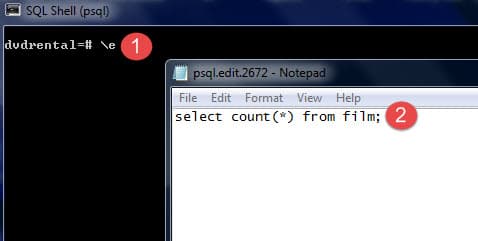
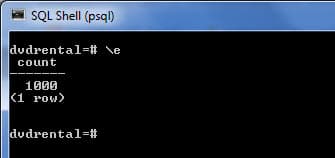
After you type the command in the editor, save it, and close the editor, psql will execute the command and return the result.
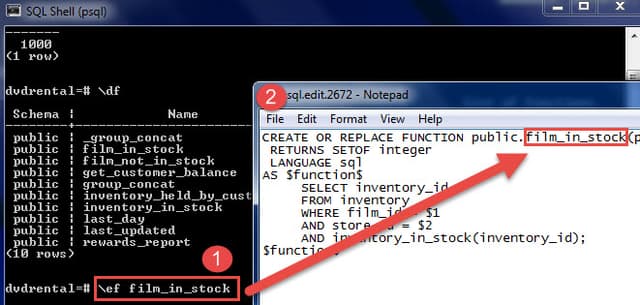
It is more useful when you edit a function in the editor.
\ef [function name]
16) Switch output options #
psql supports some types of output format and allows you to customize how the output is formatted on the fly.
\acommand switches from aligned to non-aligned column output.\Hcommand formats the output to HTML format.
17) Quit psql #
To quit psql, you use \q command and press Enter to exit psql.
\q
PostgreSQL vs. MySQL #
The choice between PostgreSQL and MySQL is crucial when selecting an open-source relational database management system.
Both PostgreSQL and MySQL are time-proven solutions that are capable of competing with enterprise solutions alternatives like Oracle Database and SQL Server.
MySQL has been famous for its ease of use and speed, whereas PostgreSQL boasts many advanced features, earning it the reputation of an open-source counterpart to Oracle Database.
The following table compares the features of PostgreSQL 16.x vs. MySQL 8.x:
| Feature | PostgreSQL | MySQL |
|---|---|---|
| Known as | PostgreSQL is an open-source project. | The world’s most advanced open-source database. |
| Development | PostgreSQL is an open-source project. | MySQL is an open-source product. |
| Pronunciation | post gress queue ell | my ess queue ell |
| Licensing | MIT-style license | GNU General Public License |
| Implementation programming language | C | C/C++ |
| GUI tool | pgAdmin | MySQL Workbench |
| ACID | Yes | Yes |
| Storage engine | Single storage engine | Multiple storage engines e.g., InnoDB and MyISAM |
| Full-text search | Yes | Yes (Limited) |
| Drop a temporary table | No TEMP or TEMPORARY keyword in DROP TABLE statement | Support the TEMP or TEMPORARY keyword in the DROP TABLE statement that allows you to remove the temporary table only. |
DROP TABLE | Support CASCADE option to drop table’s dependent objects e.g., tables and views. | Does not support CASCADE option. |
TRUNCATE TABLE | PostgreSQL TRUNCATE TABLE supports more features like CASCADE, RESTART IDENTITY, CONTINUE IDENTITY, transaction-safe, etc. | MySQL TRUNCATE TABLE does not support CASCADE and transaction safe i.e., once data is deleted, it cannot be rolled back. |
| Auto increment Column | SERIAL | AUTO_INCREMENT |
| Identity Column | Yes | No |
| Window functions | Yes | Yes |
| Data types | Support SQL-standard types as well as user-defined types | SQL-standard types |
| Unsigned integer | No | Yes |
| Boolean type | Yes | Use TINYINT(1) internally for Boolean |
| IP address data type | Yes | No |
| Set a default value for a column | Support both constant and function call | Must be a constant or CURRENT_TIMESTAMP for TIMESTAMP or DATETIME columns |
| CTE | Yes | Yes (Supported CTE since MySQL 8.0) |
EXPLAIN output | More detailed | Less detailed |
| Materialized views | Yes | No |
| CHECK constraint | Yes | Yes (Supported since MySQL 8.0.16, Before that MySQL just ignored the CHECK constraint) |
| Table inheritance | Yes | No |
| Programming languages for stored procedures | Ruby, Perl, Python, TCL, PL/pgSQL, SQL, JavaScript, etc. | SQL:2003 syntax for stored procedures |
FULL OUTER JOIN | Yes | No |
INTERSECT | Yes | Yes (INTERSECT in MySQL 8.0.31) |
EXCEPT | Yes | Yes |
| Partial indexes | Yes | No |
| Bitmap indexes | Yes | No |
| Expression indexes | Yes | Yes (functional index in MySQL 8.0.13) |
| Covering indexes | Yes (since version 9.2) | Yes. MySQL supports covering indexes that allow data to be retrieved by scanning the index alone without touching the table data. This is advantageous in the case of large tables with millions of rows. |
| Triggers | Support triggers that can fire on most types of command, except for ones affecting the database globally e.g., roles and tablespaces. | Limited to some commands |
| Partitioning | RANGE, LIST | RANGE, LIST, HASH, KEY, and composite partitioning using a combination of RANGE or LIST with HASH or KEY subpartitions |
| Task Scheduler | pgAgent | Scheduled event |
| Connection Scalability | Each new connection is an OS process | Each new connection is an OS thread |