Bash基础
Shell与Bash
sh 是一种标准,bash是符合这个标准的实现。
下面的流程是双向的,由于目前markdown中的编辑器不支持双向箭头操作,故先暂时这样。双向箭头, 同时也不支持subgraphs。
flowchart LR
subgraph User
    用户
end
用户<-->伪终端
用户<-->控制台

subgraph Term
    伪终端<-->shell接收解析执行
    控制台<-->shell接收解析执行
end

shell接收解析执行<-->OS
subgraph Kernel
    OS<-->硬盘I/O
    OS<-->网络I/O
    OS<-->其它操作
end
这里上传到github按照图片存储展示
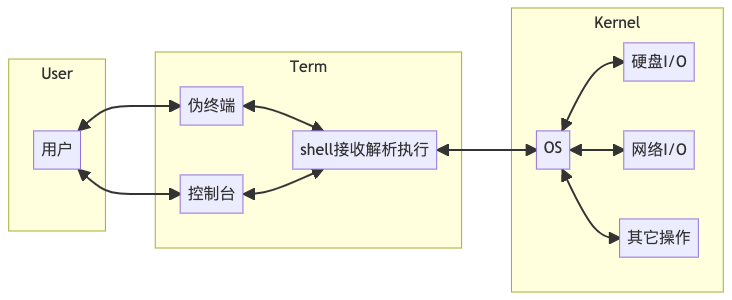
Login Bash
Login Bash初始化的配置文件分为下面两类
- 全局配置
/etc/profile
- 个人配置
~/.bash_profile~/.bash_login~/.profile
Login Sh
Login Sh在初始话的时候只会加载下面两个配置文件/etc/profile~/.profile
查看用户使用的
sh类型/ect/passwd
创建用户的时候指定
shuseradd -s /bin/bash
修改用户的
shusermod, chsh
为了统一两种 Bash的配置,在login bash里应用interactive bash的配置
if [ -f "$HOME/.bashrc" ]; then
    source "$HOME/.bashrc"
fi
脚本执行顺序
- 父
shellFork–Sub-shell Sub-shell继承父shell环境Sub-shell调用指定的解释器执行该脚本Sub-shell退出,相关环境被销毁- 父
shell取得Sub-shell的退出状态
Bash命令的解析过程
命令解析的时候一定按照下面的7个步骤进行执行
1. 花括号扩展 (brace expansion)
echo {1..3}1 2 3
mkdir /data/{1,2,3,4}}- 在
/data目录下创建了1 2 3 4四个文件
- 在
mkdir /tmp/tmp-{a..d}- 在
/tmp目录下创建tmp-atmp-btmp-ctmp-d四个文件夹
- 在
echo {1,2}{a,b}- 这里展开结果按照笛卡尔积模式
- 结果为
1a 1b 2a 2b
2. 波浪线扩展 (tilde expansion)
~可扩展成用户的$HOME值
3. 变量扩展 (parameter, variable expansion)
- 将带
$的变量名扩展成变量值var="xyz"echo $var
4. 算术扩展 (arithmetic expansion)
- 整数算术运算
(( i++ ))(( 10 >=5 ))(( sum = i +j ))sum=$(( i + j ))
5. 命令替换 (command substitution)
- 将命令的输出赋值给一个变量
todya=$( date +%F )line=$( grep xxx yyy )
6. 词的拆分 (word splitting)
- 变量值按空格拆分(也就是按照IFS设定的进行拆分)
var="a b c"
for v in $var;do
    echo $v
done
7. 路径名扩展 (pathname expansion)
- 通配符扩展成文件名
*任意长度的字符串 和?只接收任意的一个字符 及[]rm *.bakls ?.shecho [wW]in7.iso
小测试
i=1;j=10; echo {$i..$j}的结果- 结果为
{1..10} eval echo {$i..$j}- 结果为
1 2 3 4 5 6 7 8 9 10
- 结果为
- 结果为
如何快速把某目录下的文件夹删除
rm -rf */
知识点总结
来自
window的CRLF的换行符unix2dosdos2unixod查看文件的二进制
命令的结束符(分割符)
#!/bin/bash

set 1 2 3 '4 4'
echo 'using $*'

for i in $*; do
    echo "\$i: [$i]"
done

echo
echo 'using "$@"'

for i in "$@"; do
    echo "\$@: [$i]"
done

# 输出结果
using $*
$i: [1]
$i: [2]
$i: [3]
$i: [4]
$i: [4]

using "$@"
$@: [1]
$@: [2]
$@: [3]
$@: [4 4]
脚本的权限位
rwxrwxrwx
文件掩码( umask )
umask查看当前设置的值0022umask对可执行权限不起作用
working dir(pwd)- 获取当前执行脚本所在目录
#!/bin/bash

ls -l /proc/$$/fd/255

appname=$( readlink /proc/$$/fd/255 )
workdir=$( dirname $appname )

echo "appname: $appname"
echo "workdir: $workdir"
#!/bin/bash

get_workdir() {
    local dir=$( dirname $0 )
    pwd=$(cd "$dir" && pwd )

    echo $pwd
    pwd
}

workdir=$( get_workdir )
echo "workdir: $workdir"
- 脚本的退出与退出码
Bash语法
变量
- 变量的赋值
- 变量的引用
- 合法的变量名: 字母 数字 下划线;数字不能出现在收字符
- 命令替换
- ‘``’
$( command )推荐
注意点
- = 号两边不允许空格
- $name 是 ${name} 的间写
- 需要使用${name}的两种情况
- 如 $user_name
- 脚本的参数及函数的参数
常用变量
| 变量 | 说明 |
|---|---|
$? | 上一个命令的退出状态 |
$! | 最后一个后台进程的pid |
$0 | 当前脚本的名字 |
| $$ | 当前脚本的pid |
$n | n 为1,2…n 脚本或函数的参数 |
$@ | 脚本或函数的所有参数 |
$* | 脚本或函数的所有参数 |
$# | 脚本或函数的参数个数 |
$UID | 当前用户的uid |
$LOGNAME | 当前用户名 |
$HOSTNAME | 主机名 |
$RANDOM | 1~32767间的随机数 |
$SECONDS | 当前脚本已经消耗的秒数 |
$PWD | 当前的工作目录 |
$HISTTIMEFORMAT | 历史记录的时间格式 |
环境变量
环境变量是bash或用户预设置的变量,可被继承并直接使用;有些环境变量会影响shell的行为。
| 命令 | 说明 |
|---|---|
$PATH | 命令搜索路径名 |
$LANG | local 默认值 |
$LC_ALL | local 强制设置,如果设置了其它设置不生效 |
TERM | 终端类型,一般为 xterm |
ENITOR | 系统默认编辑器 |
- 环境变量的设置
export name=value
- 只对一个命令设置
name=value ./foobar.sh
数值运算
流程控制
if
&&代表and||代表or
case
case中的字符匹配规则*匹配零个或多个任意字符?匹配一个任意字符[]字符组,可以匹配组中的一个字符|A|BA或者B
read anser
case anser in
[yY][eE][sS])
    ...
    ;;
[nN][oO])
    ...
    ;;
*)
    ...
    ;;
esac
while
- 形式一
while expression; do
    ...
done
- 形式二
expression 为false一直执行,如果expression为true退出
until expression; do
    ...
done
- 示例说明
#!/bin/bash

file=$0
cnt=0

cat $file | while read; do
    (( cnt++ ))             # 这里变量累加不会影响上面定义的cnt,原因是管道会重新启动一个subshell,子进程的赋值不会影响到父进程
    echo -e "$cnt:\t$REPLY"
done

echo "total:[$cnt]"  # 这里不会输出预期的效果,默认为0
for
- 支持
break和continue
for var in var1 var2 ...
do
    ...
done
重定向
一个进程运行时,内核为其准备三个默认文件描述符;STDIN(0), STDOUT(1), STDERR(2)
echo xxx > file
echo xxx 1> file  # 和上一行效果一样
echo xxx >> file
read line < file
some command 2> log.err
some command > /dev/null 2>&1  # 把 1和2都重新定向到 /dev/null
some command &> /dev/null  # 推荐
some command &>> log       # 可惜,不支持
some command >> log 2>&1
- 块重定向1
if [[ $error ]]; then
    echo "error: $error" >> "$log"
else
    echo "ok" >> "$log"
fi


####
if [[ $error ]]; then
    echo "error: $error"
else
    echo "ok"
fi >> "$log"
- 块重定向2
echo message1 >> "$log"
echo message2 >> "$log"

####
{
    echo message1
    echo message2
} >> "$log"

#### 圆括号会新起一个sbushell,即在()中的变量在外面是感知不到的
(
    echo message1
    echo message2
) >> "$log"
- 解决统计文件行数
#!/bin/bash

file=$0
cnt=0

while read line; do
    (( cnt++ ))
    echo -e "$cnt: $line"
done < "$file"

echo "total:[$cnt]"
函数
- 调用 需先定义后调用。名字+参数
- 参数 $1, $2 …. $#, $@
- 返回值 标准输出
- 退出状态 return $num; 或最后一个命令的退出状态
- 函数内部的变量如果没有添加
local会变成全局变量 - 命名建议
- 动作类
- get_xxx
- set_xxx
- 判断真假类
- is_xxx
- has_xxx
- 动作类
关于脚本的建议
- 代码应分为三部分:变量 函数 主程序
- 给变量和函数起一些有意义的名字,适当注释
- 变量多时,可独立成配置文件
- 特定功能,用函数实现
- 函数多时,可独立成函数库
- 酌情记录日志
- 严重错误时要告警
参考书籍
IFS
IFS 是internal field separator的缩写,为shell默认内置变量可以理解为域分隔符。默认IFS=$’ \t\n’ 为空格,制表符和换行
示例1
[root@VM-199-77-centos ~]# set -- 1 "2 3" 4
[root@VM-199-77-centos ~]# for i in "$@";do echo $i; done
1
2 3
4
[root@VM-199-77-centos ~]# for i in "$*";do echo $i; done
1 2 3 4
[root@VM-199-77-centos ~]# for i in $@;do echo $i; done
1
2
3
4
示例2
#!/bin/bash
ifsbak=$IFS
IFS=:
var="mako"
str="how:are:you $var"
echo no quote ---- $str
echo soft quote ---"$str"
echo hard quote ---- 'how:are:you $var'
IFS=$ifsbak

# 输入信息如下
no quote ---- how are you mako
soft quote --- how:are:you mako # ifs不生效
hard quote ---- how:are:you $var
示例3
1 line    # 这里是空格
2   line  # 这里是table健
3 line    # 这里是空格
for line in `cat file`
do
    echo $line
done

# 输出内容应该如下
1
line
2
line
3
line

for line in "`cat file`" # 双引号cat file的内容作为整体
do
    echo x$line
    echo y"$line" # 有引号不改变输出原样输出
done

# 输出内容如下
x1 line 2 line 3 line
y1 line
2       line
3 line

IFS=$'\n''
for line in `cat file`
do
    echo $line
done

# 输出内容如下
1 line
2       line
3 line
注意为什么设置IFS的时候使用
$'\n'而不直接使用'\n'echo -e 'a\nb\nc'会对特殊字符转义;采用echo $'a\nb\nc'同 -e效果一致。
如果设置 IFS=’\n’ 其实就是 ’n’的话 则如
anbncn会直接打印a b c
示例4
➜  ~ cat /etc/passwd | grep ^root
root:*:0:0:System Administrator:/var/root:/bin/sh
目的以冒号分割,一次输出各个字段名
#!/bin/bash

IFS=':'
for line in $(cat /etc/passwd | grep ^root)
do
    echo $line
done
# 输出如下内容
root
*
0
0
System Administrator
/var/root
/bin/sh
$@ 和 $* IFS总结
你只的了解 $@ $* 吗(IFS=:) 设置默认IFS为 :
#!/bin/bash

IFS=:

set -- "one" "two:2" "three::3:33" "four 4" "" "five,5"

echo '$@---' $@     # $@--- one two 2 three  3 33 four 4  five,5
echo '$*---' $*     # $*--- one two 2 three  3 33 four 4  five,5
echo '"$@"---' "$@" # "$@"--- one two:2 three::3:33 four 4  five,5
echo '"$*"---' "$*" # "$*"--- one:two:2:three::3:33:four 4::five,5
不推荐不添加引号的情况
"$@"参数之间用空格分割"$*"参数之间用IFS第一个字符分割- 如果
IFS为空格或制表符,最终输出会合并该分割符后输出 - 当不熟悉
$*/$@时,尽量使用$@ - 按行读取文件时,多用
while少用for
RE,wildcard 正则与通配符
常用
?.*
- 关键点
- 如再命令行需要用到正则,切记使用引号或转义符
- 不适用引号,shell解释器默认碰到该类字符会尝试用通配符去解析
注意:若想禁用通配,可使用
set -f; 打开使用set +f
- 如下两个例子
find . -name "*.png"find . -name *.png # 当前文件默认有两个 1.png 2.png会输出error
变量
- 待整理
精通下面的用法吗?某些环境下不需要用awk、sed,其实用以下方法更简洁,容易传承
- 截取变量:
${parameter:offset}, ${parameter:offset:length} - 匹配(#)/贪婪匹配(##)之前的:
${parameter#word}, ${parameter##word} - 匹配(#)/贪婪匹配(##)之后的:
${parameter%word}, ${parameter%%word} - 字符串替换: ${parameter/pattern/string}, ${parameter//pattern/string}
- ${parameter/#pattern/string}, ${parameter/%pattern/string}
- ${!variable} -> eval echo $${variable} -判断参数是否存在,不存在使用word替换: ${parameter:-word}, ${parameter:=word}
- ${parameter:?word}. ${parameter:+word}
使用的场景思考
expr
此处也是针对变量处理的一些方法,可以不记住所有的用法,但一定得知道哪些问题可以通过expr简单解决,然后再man具体方法
直接上实例比较直接,变量x=abcdab
- expr match $x “.” -> 1
- expr $x : “abc”-> 3
- expr $x : “bc” -> 0
- expr $x : ‘(ab[a-z]{2})’ ->a bcd
- expr $x : ‘.*([a-z]ab)’-> dab
- expr index $x “b”-> 2
- expr index $x “e”-> 0
- expr length $x -> echo ${#x}
- expr substr $x 2 3-> bcd
重定向
历史案例
ipfile 文件按行存储ip;需求:查找所有ip的主机名

cat ipfile | while read ip; do
    ssh $ip hostname
done

# 理想 每个都可以正常
# 现实 只有第一个


i=0; seq 10 | while read val;do
i=$((i+1));
echo "line $i --> value is $val"
awk '{print "bug: miss value--"$0}';
done
Advanced Bash Scripting Guide
Special Characters
#
- Comments. Lines beginning with a
#(with the exception of#!) are comments and will not be executed. - a quoted or an escaped
#in an echo statement does not begin a comment. Likewise, a#apperas in certain parameter-substitution constructs and in numerical constant expressions. (某些参数替换结构和数值常数表达式)
;
Command separator [semicolon]. Permits putting two or more commands on the same line.
echo hello; echo thereNote that the “;” sometimes needs to be escaped.
;;
Terminator in a case option [double semicolon]
case "$variable" in
  abc) echo "\$variable = abc" ;;
  xyz) echo "\$variable = xzy" ;;
esac
;;&;&
- Terminator in a case option (version 4+ of Bash)
;;&表示当前分支的结束,并且 case 语句将继续测试下一个分支的匹配条件。如果下一个分支的条件匹配,则执行对应的命令。;&表示当前分支的结束,但不会停止 case 语句的执行,而是继续执行下一个分支,而不考虑下一个分支的匹配条件。
.
- “dot” command [period]. Equivalent to source. This is a bash builtin.
- “dot” as a component of a filename.
- “dot” character match. When matching characters, as part of regular expression, a “dot” matches a single character.
"
- partial quoting [double quote]. “STRING” preserves (from interpretation) most of the special characters within STRING.
'
- partial quoting [single quote]. ‘STRING’ preserves all special characters within STRING. This is a stronger form of quoting than “STRING”.
,
comma operator. The comma operator links together a series of arithmetic operations. All are evaluated, but only the last one is returned.
let "t2 = ((a=9, 15 / 3))"
# Set "a = 9" and "t2 = 15 / 3"
The comma operator can also concatenate string.
for file in /{,use/}bin/*cal; do echo $file; done
#/bin/cal
#/bin/ncal
#/use/bin/*cal
,,,
- Lowercase conversion in parameter substitution (added in version 4 of Bash)
\
- escape [backslash]. A quoting mechanism for single characters.
/
- Filename path separator [forward slash]. Separaters the components of a filename.
- This is also the division arithmetic operator.
- `
- command substitution.
:
null command [colon]. This is the shell equivalent of a “NOP” (no op, a do-nothing operation). It may be considered a synonym for the shell builtin true. The “:” command is itself a Bash builtin, and its exit status is true (0).
:
echo $? # 0
while : # same as while true do .... done : > data.xxx # File "data.xxx" now empty # Same effect as cat /dev/null >data.xxx # However, this does not fork a new process, since ":" is a builtin. # 检查环境变量是否设置,并在未设置时显示错误信息并退出脚本 : ${HOSTNAME?} ${USER?} ${MAIL?} # prints error message if one or more of essential environmental variables not set.a colon can serve as a placeholder in an otherwise empty function
not_empty()
{
  :
} # Contains a : (null command), and so is not empty.
!
测试条件中取反;执行命令取反
间接引用变量, 适用场景
- 动态变量名: 例如:在处理带有索引或前缀的多个变量时。
- 数组模拟: 虽然 Bash 也支持数组,但在某些情况下,间接引用可以用于实现类似数组的效果。
- 参数传递: 在脚本中传递变量名,并在函数中间接引用这些变量。
variable_name="foo"
foo="Hello, World!"
echo ${!variable_name} # Hello, World!
15: *
- wild card [asterisk]. The
*character serves as a “wild card” for filename expansion in globbing. By itself, it matches every filename in a given directory. - The
*also represents any number (or zero) characters in a regular expression.
?
- test operator. condition?result-if-true:result-if-false
(( var0 = var1<98?9:21 )) # if [ "$var1" -lt 98 ] # then # var0=9 # else # var0=21 # fi - wild card.
$
- variable substitution
- end-of-line. In a regular expression, a “$” addresses the end of a line of text.
${}
- parameter substitution
$'...'
- quoted string expansion
$*, $@
- positional parameters
$?
- exit status variable.
$$
- processID variable.
()
command group
(a=hello; echo $a)array initialization
{xxx,yyy,zzz,...}
brace expansion.
echo \"{These,words,are,quoted}\" # " prefix and subffix
# "These" "words" "are" "quoted"

cp file2.{txt,backup} # Copies "file2.txt" to "file2.backup"
{a..z}
Extended brace expansion.
echo {a..z} # a b c d e f g h i j k l m n o p q r s t u v w x y z

echo {0..3} # 0 1 2 3
{}
- Block of code
- placeholder for text. Used after xargs -i (replace strings option)
{} \;
- pathname. Mostly used in find constructs. This is not a shell builtin.
[]
- test
- array element
- range of characters.
[[]]
- test.
- ``
Shell 作为一门脚本语言,除了基本的 if、for、while 语句外,还有一些高级特性可以提升脚本的可读性、健壮性和执行效率。以下是一些高级的 Shell 语法和函数:
1️⃣ 进程替换(Process Substitution)
可以将命令的输出作为文件处理,而不需要创建临时文件:
diff <(ls dir1) <(ls dir2) # 比较两个目录的文件列表
📌 作用:
✅ 省去创建临时文件的麻烦
✅ 适用于 diff、grep、awk 等需要文件作为输入的命令
2️⃣ mapfile(高效读取数组)
可以一次性将命令输出读入数组:
mapfile -t lines < <(ls)  # 读取 `ls` 输出到数组
echo "第一个文件: ${lines[0]}"
📌 作用:
✅ 比 while read 更高效(直接存入数组)
✅ 不丢失空行(read 可能会忽略空行)
3️⃣ coproc(后台协程)
允许 Shell 以协程的方式运行子进程,并与其通信:
coproc myproc { grep "error" /var/log/syslog; }  # 后台运行 grep
read line <&"${myproc[0]}"  # 读取协程输出
📌 作用:
✅ 可以并行处理任务
✅ 适用于与子进程通信(比 & 运行后台进程更高级)
4️⃣ exec 重定向所有标准输出
Shell 允许全局重定向所有标准输入/输出:
exec > output.log 2>&1  # 将所有 stdout 和 stderr 重定向到文件
echo "这个输出会写入 output.log"
ls /nonexistent  # 错误信息也会写入 output.log
📌 作用:
✅ 适用于日志记录(避免在每条命令后加 » file)
5️⃣ declare 进行变量类型限制
在 Bash 里可以限制变量的类型:
declare -i number=10  # 强制整数
declare -r myvar="只读变量"  # 只读变量
declare -a array=("one" "two")  # 定义数组
declare -A dict=(["name"]="Tom" ["age"]=25)  # 关联数组
📌 作用:
✅ 增强类型安全(避免 string+1 这样的错误)
✅ 防止变量被意外修改(如 readonly 限制关键变量)
6️⃣ timeout 设置超时
避免死循环:
timeout 5 ping 8.8.8.8 # 运行 5 秒后自动终止
📌 作用:
✅ 防止命令无限等待(如 curl、ssh 等)
7️⃣ 解析 JSON(jq 命令)
json='{"name": "Alice", "age": 25}'
echo "$json" | jq '.name'  # 输出 "Alice"
📌 作用:
✅ 处理 JSON 数据,比 awk/sed 更方便
8️⃣ set -euo pipefail(让脚本更健壮)
set -euo pipefail
📌 作用:
✅ -e 遇到错误立即退出
✅ -u 使用未定义变量时报错
✅ -o pipefail 让 A | B | C 失败时不会继续执行
9️⃣ xargs -P 并行处理
echo {1..5} | xargs -n1 -P3 sleep # 并行执行 3 个任务
📌 作用:
✅ 加速批量任务,如下载、文件处理等
🔟 printf 高级格式化
printf "%-10s | %5d\n" "Name" 100 # 格式化输出
📌 作用:
✅ 比 echo 更强大,支持对齐、浮点数格式化等
总结
| 高级特性 | 示例 | 作用 |
|---|---|---|
| 进程替换 | diff <(ls dir1) <(ls dir2) | 省去临时文件 |
| mapfile | mapfile -t arr < file.txt | 高效读取数组 |
| coproc | coproc myproc { grep “error” file; } | 并行协程 |
| exec | exec > output.log 2>&1 | 全局重定向 |
| declare | declare -i num=10 | 变量类型限制 |
| timeout | timeout 5 command | 超时控制 |
| jq | `echo “$json” | jq ‘.name’` |
| set -euo pipefail | set -euo pipefail | 让脚本更健壮 |
| xargs -P | `echo {1..5} | xargs -n1 -P3 sleep` |
| printf | `printf “%-10s | %5d\n” “Name” 100` |
🚀 掌握这些 Shell 高级语法,可以让脚本更高效、更健壮、更优雅!
当然可以,以下是整理好的 Markdown 内容,适合直接复制到你的笔记中(如 Obsidian、Notion、Markdown 文件等):
Shell 脚本中为何使用 { ... } 包裹整个脚本
📌 问题
在一些 Shell 脚本中,常常看到以下结构:
#!/usr/bin/env bash

{ # this ensures the entire script is downloaded #

# 脚本内容
some_function() {
  echo "Hello"
}
some_function

} # this ensures the entire script is downloaded #
为什么要用 { ... } 把整个脚本包裹起来?这样做有什么好处?
✅ 答案
这是一个 Shell 脚本技巧,主要用于:
确保整个脚本在下载完成并被完全解析之后再执行
🧠 原因解释
在执行远程脚本时,例如:
curl -s https://example.com/script.sh | bash
脚本是以流式方式传给 bash 的,会出现:
边下载边执行
如果下载中断,脚本会只执行了一部分
函数定义、变量赋值可能不完整,甚至执行危险命令
🛡 加上 { ... } 的作用
使用大括号包裹:
{
  # 所有脚本内容
}
等于告诉 bash:
先把整个代码块读完并确认语法完整后再执行,否则不执行。
这样做能显著提升远程执行脚本时的稳定性与安全性。
📦 使用场景
在线安装脚本(nvm、rustup、rvm 等)
托管在 GitHub/Gitee 的
curl | bash脚本对完整性有要求的初始化脚本
✅ 示例对比
❌ 没有使用 {}(可能部分执行)
#!/usr/bin/env bash

setup_env
# 假设这里还没下载完或中断
install_dependencies
如果网络中断,
bash已经开始执行setup_env,但后续内容丢失。
✅ 使用 {}(确保完整执行)
#!/usr/bin/env bash
{
  setup_env
  install_dependencies
}
Shell 会完整解析完
{}里的内容后,才开始执行其中的命令。
✍ 总结
使用
{ ... }包裹整个脚本体是一种防御式编程技巧,适用于通过管道执行的脚本(如curl | bash),可以避免部分执行带来的错误或风险。
建议你在所有在线执行脚本中使用这种结构,尤其是涉及部署或安装操作时。
| 格式 | 说明 |
|---|---|
| ${string: start :length} | 从 string 字符串的左边第 start 个字符开始,向右截取 length 个字符。 |
| ${string: start} | 从 string 字符串的左边第 start 个字符开始截取,直到最后。 |
| ${string: 0-start :length} | 从 string 字符串的右边第 start 个字符开始,向右截取 length 个字符。 |
| ${string: 0-start} | 从 string 字符串的右边第 start 个字符开始截取,直到最后。 |
| ${string#*chars} | 从 string 字符串第一次出现 chars 的位置开始,截取chars 右边的所有字符。 |
| ${string##*chars} | 从 string 字符串最后一次出现 chars 的位置开始,截取chars 右边的所有字符。 |
| ${string%*chars} | 从 string 字符串第一次出现 chars 的位置开始,截取chars 左边的所有字符。 |
| ${string%%*chars} | 从 string 字符串最后一次出现 chars 的位置开始,截取chars 左边的所有字符。 |
| 使用场景 | trap 处理方式 | |
|---|---|---|
| 退出时清理资源 | trap cleanup EXIT | |
| 防止 Ctrl+C 终止 | trap ’echo “忽略 Ctrl+C”;’ SIGINT | |
| 任务完成后通知 | trap notify_exit EXIT | |
| 记录错误日志 | trap log_error ERR | |
| 超时终止任务 | trap timeout_handler SIGALRM | |
| 进程退出保存进度 | trap save_progress EXIT | |
| 监听后台任务完成 | trap ’echo “任务结束”;’ CHLD | |
| 遇错立即退出 | set -e + trap ‘…’ ERR |
1. trap 使用
trap命令用于捕获和处理信号,特别是用于清理资源、错误处理或在程序终止时执行特定的操作。
- 捕获
Ctrl+C信号
trap 'cleanup' SIGINT

cleanup() {
  echo "Received Ctrl+C . Cleaning up..."
  # 执行清理操作
  exit 1
}
- 获退出信号
trap 'cleanup' EXIT

cleanup() {
  echo "Script is exting. Cleaning up..."
}
- 忽略信号
# 忽略Ctrl+C信号
trap '' SIGINT
- 重置信号处理
# 恢复Ctrl+C信号的默认处理
trap - SIGINT
- 捕获自定义信号
trap 'my_handler' SIGUSR1

my_handler() {
  echo "Custom signal received."
}
- 捕获并打印信号
trap 'handle_signal' SIGHUP SIGINT SIGTERM

handle_signal() {
  echo "Received signal: $1"
}
- 类似
go defer的功能
#!/bin/bash

# 定义一个清理函数
cleanup() {
 echo "执行清理操作..."
}

# 注册 trap, 确保无论脚本如何退出,都执行 cleanup
trap cleanup EXIT

echo "运行脚本..."
exit 0
- 仅在发生错误时执行 defer
#!/bin/bash

# 仅在脚本异常退出时执行 cleanup
cleanup() {
 echo "发生错误,执行清理..."
}

# 仅在非零退出码时触发
trap 'cleanup' ERR

echo "执行某些操作..."

ls /nonexistent  # 触发错误
echo "这句不会执行"
- 捕获 Ctrl+C (SIGINT)
- INT 信号代表 Ctrl+C,触发 cleanup。
#!/bin/bash

cleanup() {
    echo "脚本被中断,执行清理..."
}

trap cleanup INT  # 捕获 Ctrl+C

echo "运行任务,按 Ctrl+C 试试看..."
sleep 10  # 可以按 Ctrl+C 终止
- 批量捕获多个信号
#!/bin/bash
set -e

cleanup() {
    echo "发生错误或退出,执行清理..."
}

trap cleanup EXIT ERR INT TERM  # 监听退出、错误、Ctrl+C、kill

echo "执行任务..."
ls /nonexistent  # 触发错误
https://shreevatsa.wordpress.com/2008/03/30/zshbash-startup-files-loading-order-bashrc-zshrc-etc/
https://blog.flowblok.id.au/2013-02/shell-startup-scripts.html
首先备份当前配置文件
mv /etc/yum.repos.d/CentOS-Base.repo /etc/yum.repos.d/CentOS-Base.repo.backup
下载新的 CentOS-Base.repo 到 /etc/yum.repos.d
CentOs8wget -O /etc/yum.repos.d/CentOS-Base.repo http://mirrors.aliyun.com/repo/Centos-8.repo
CentOs7wget -O /etc/yum.repos.d/CentOS-Base.repo http://mirrors.aliyun.com/repo/Centos-7.repo
运行 yum makecache 生成缓存
yum makecache
重载
- dnf clean all # 清除所有的缓存文件
- dnf makecache # 制作元数据缓存